
Live File Backup2.37 - Download
You'll be able to download in few seconds.
Publisher Description
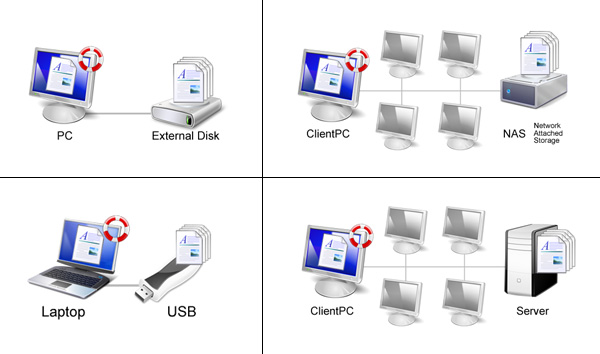
Live File Backup is the user-friendly real-time/live backup program for your home and business PC! The Continuous and automatic backup software is creating automatically file copies (generations/versions) when saving in the background. The backup files and its correponding copies can automatically be saved to local or external drives, USB memory sticks, network drives, network attached storage (NAS), as well as Internet or Intranet FTP servers.
Have you ever experienced minutes of horror when your presentation went unexpectedly lost short before completion? Possibly, the document has been deleted by mistake or the data was accidentally amended (most common issue of data loss) or the program failed to store the file due to inexplicable reasons. There are also bugs or viruses which could maliciously destroy your data while working. Regular daily, weekly or monthly backups provide then only outdated data and the expensive RAID hard-disk systems protect from the relative seldom technical failures of hard-disks only. Moreover, the normal system backups are often not conducted regularly.
The only solution here is an additional real-time (continuous data protection CDP) or live backup which continuously saves the working files in the background and keeps several older versions of each file for restoration. Even more, Live File Backup does its tasks in an outstanding straightforward and user-friendly manner so that you never again have to bother about your most valuable data - namely your working files. Live File Backup is the automatic backup software for continous data protection between regular system backups.
About Live File Backup
This Backup & Restore program is available in English, German, French. It was last updated on 29 September, 2026. Live File Backup is compatible with the following operating systems: Windows.
The company that develops Live File Backup is Infonautics GmbH. The latest version released by its developer is 2.37.
The download we have available for Live File Backup has a file size of 4.2 MB. Just click the green Download button above to start the downloading process. The program is listed on our website since 2016-04-04 and was downloaded 0 times. We have already checked if the download link is safe, however for your own protection we recommend that you scan the downloaded software with your antivirus. Your antivirus may detect the Live File Backup as malware if the download link is broken.
How to install Live File Backup on your Windows device:
- Click on the Download button on our website. This will start the download from the website of the developer.
- Once the Live File Backup is downloaded click on it to start the setup process (assuming you are on a desktop computer).
- When the installation is finished you should be able to see and run the program.
Program Details
System requirements
Download information
Pricing
Version History
version 2.37
posted on 2016-04-04
Disclaimer
External Download
We do not host Live File Backup on our servers. We did not scan it for viruses, adware, spyware or other type of malware. This app is hosted by the software publisher and passed their terms and conditions to be listed there. We recommend caution when installing it.
The external download link for Live File Backup is provided to you by apps112.com without any warranties, representations or guarantees of any kind, so access it at your own risk.
If you have questions regarding this particular app contact the publisher directly. For questions about the functionalities of apps112.com contact us.
